
Find My CPR Card
Find My CPR Card
Course Completion Cards
Same-Day Course Completion Card
Students who successfully complete all course requirements at a MedUltra CPR training location will receive their certification card the same day. Certification cards are typically processed shortly after class concludes and will be issued by the end of the business day. Processing times may vary based on daily class volume.
Claiming Your AHA eCard
eCard Arrival
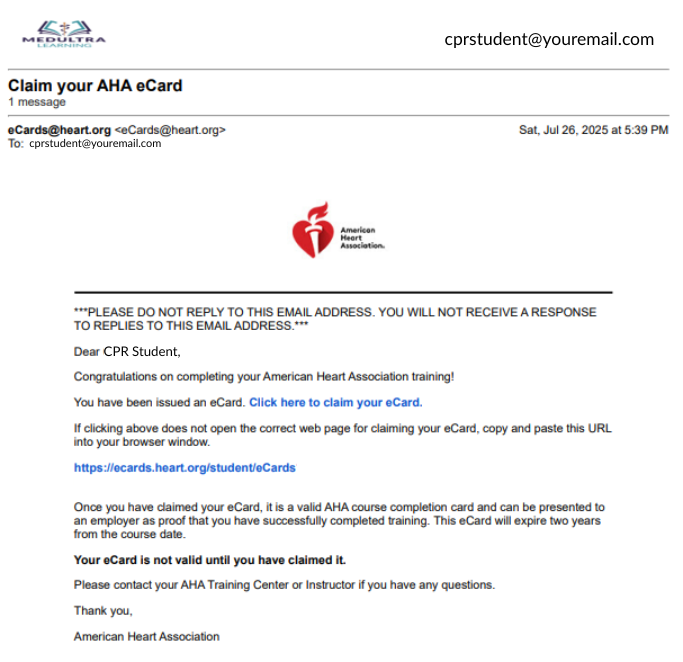
All course completion cards are issued electronically through email. Once issued, cards generally arrive via email within ten minutes. The sender address is eCards@heart.org and the title of the email is "Claim Your AHA eCard."
Once the eCard is Received
Follow the link within the email to access your eCard account. If you have not claimed your card, claim it. If you cannot recall the answer to your security question, you can reset it.
*You must claim your own course completion card. MedUltra Learning & the MedUltra CPR team members are not permitted to electronically “claim” your eCard for you.
Download & Share Your eCard
Once you’ve claimed your cards and have access to your “My eCards” Account, accessing you completion certification is painless.
Here are two ways you can share your Completion Card with Others:
Choose Your Download Format
To download an eCard, select the size you would like (Full or Wallet) where it says, “View eCard. Designate the download folder on your device.
Send via Email Directly from Account
To email an eCard, select “Email Cards,” enter the email address, and select “Email.” Note that the sender address is eCards@heart.org.
Example and the title of the email is "Claim Your AHA eCard" from eCards@heart.org
Exceptions to Same-Day Issuance
Corporate Classes
Issuance of cards is based on the contract & terms of service. These trainings are not for open enrollment and are typically organized by an employer. If you are in urgent need of your completion card, please reach out to the training coordinator at your facility. Otherwise, cards will be issued accordingly.
Open Enrollment
MedUltra CPR requires payment at the time of registration for services that will be rendered. In the event billing is not addressed before training, such as a 3rd party organization paying by check, the completion card will be issued after payment for services is received. Completion cards will not be issued in good faith.
Submit Edit Requests for Your Card
There are a variety of reasons why an edit may be necessary to a Course Completion Card
Examples:
- Legal Name Change
- Name Correction to Match a License
- Full Name
- Add/Remove Middle Initial
- Double Surname
- Hyphenated Surname
- Spelling Correction
- Email Error
*Updates to email addresses can be performed from within the My eCard Account and does not require administrative assistance.
Option 1. Via the Training Center
- Log into your “My eCards” Account via “eCard Search“
- If the personal information listed on your eCard is incorrect, follow the “Edit” button in the top right corner of the eCard tile.
- Make the necessary edits to the personal information listed and select Save Changes at the bottom of the page to submit the edit request to your Training Center.
- If you would like said updates to be made to all your eCards select the “Do you want to update all of your active eCards?” checkbox.
- The Training Center will be sent an electronic request to approve the submitted edits.
- If the edits have not been approved, contact MedUltra CPR regarding your pending update request and the Admin Team will contact the Training Center.
Option 2. Via MedUltra CPR
- Send an email to the Admin Team at info@medultralearning.com requesting an edit to your information. In the body of the email, include the following information as it is listed on your card:
- First & Last Name
- Email Address
- Date of Class
- Discipline (BLS, ACLS, PALS, etc.
- If the class was taken directly through MedUltra CPR, the Admin Team will make the requested corrections to the card.
- If the class was instructed by an aligned instructor under MedUltra Learning’s Training Site, the information will be forwarded directly to your instructor to make the correction.
- If the edits have not been approved, contact MedUltra CPR regarding your pending update request and the Admin Team will contact your instructor.
HELP! "I Didn't Receive My Card"
- Option 1. Inbox/Spam Troubleshooting
- Option 2: Check the AHA eCard Search website
- Option 3. Access Via SMS Text
If the “Claim Your AHA eCard” email sent from eCards@heart.org was not in your inbox, here are a few more items to consider:
- Ensure that your Inbox is not full and that you have “storage” to receive emails.
- Check your spam/junk folder or type “eCards@heart.org” in the search bar of your email account.
- If you utilized an email address with a school or work email with a corporate domain as your registration email rather than a personal email account, search your email filtering software or check with your IT department.
Go to the eCard Search website & do one of the following:
- A. On the “Student” tab, enter your First Name, Last Name, and Email (must be the same as your class registration) OR
- B. If known, enter your unique eCard Code at the bottom of the page. Select “Search.”
Note: In order for students to opt-in to this service, you had to provide your mobile phone number with registration.
- Opt-in to claim/view your eCard by texting “eCard” to the number 51736.
- If the message is sent correctly per the guidance of your Instructor, you will receive instructions via text message on how to claim your eCard.
- If you attempt to opt-in and your number is not in the system, you will receive a message that your phone number was not found.
Already Claimed Your eCard & Need to Log Back In?
Step 1: Search Your Inbox
On the “Student” tab, enter your First Name, Last Name, and Email (ensure this is the email address that was used to sign up for the course) OR enter your eCard Code at the bottom of the page. Select “Search.”
Step 2: Security Question
Answer your security question. You can reset the answer if you have forgotten.
Step 3: Your "My eCards" Account
If all the information entered is correct, you will be brought to a page that shows “My eCards.” If your eCard cannot be found, contact your Training Center to verify your information.
Frequently Access Questions (FAQ) about Completion Cards
- Employer Verification
- TBD
- "My Card Data Fields are Empty"
- Visit the “eCards Search” page.
- On the “Employer” tab, enter the eCard Code (up to 20), and select “Verify.”
- The next page will show the eCard Status of the provided code(s).
BLANK
If you download your Course Completion card and the pdf is BLANK with none of your personal information in the fields, don’t fret.
This is a software update problem with the program that you selected and have chosen to default for PDFs, often Adobe. Update your Adobe program or open the PDF with a different viewer. You can also try another computer or use the Email feature within the eCard account to send the card directly to another party utilizing their email address.
This issue cannot be corrected by MedUltra as it is a correctable issue with the device you are using.